.svg)


You've got the budget. You've chosen your keywords. Your campaign is ready to launch. But when you stare at those empty headline and description fields in Google Ads, nothing comes out right.
Every version you write sounds either too salesy, too boring, or exactly like what your competitors are already saying. You know your copy needs to grab attention in a crowded search results page, but you're not sure how to make that happen.
Here's the reality: Google Ads copywriting isn't about clever wordplay or fancy marketing jargon. It's about understanding what your prospects are thinking the moment they search, and giving them a reason to click your ad instead of scrolling past it.
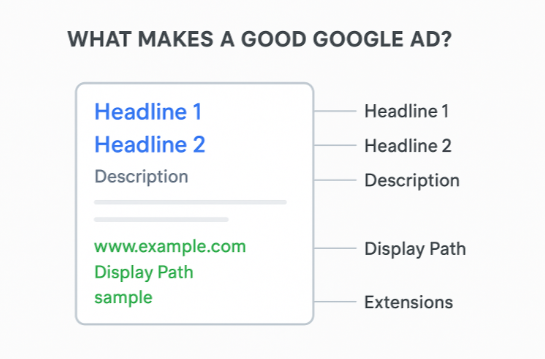
This guide walks you through the complete process of writing Google Ads copy that actually converts. You'll learn how to craft compelling headlines and descriptions, write persuasive body copy, and create call-to-action ideas that drive clicks, all while staying authentic to your brand.
Why Google Ads Copywriting Matters More Than You Think
Before we dive into the tactics, let's talk about why your ad copy deserves serious attention.
When someone searches on Google, they see multiple ads competing for their click. Your ad has maybe 2-3 seconds to convince them you're worth their time. That's all the runway you get.
Here's the key: you need to think like your customer. Before you write a single word, put yourself in their shoes. What would grab YOUR attention if you were searching for this solution? What would make YOU stop scrolling and click? If your own ad doesn't interest or engage you, it won't work for anyone else either. The best ad copy comes from genuinely understanding what your prospects want to see and feel when they're looking for help.
The difference between an ad that gets ignored and one that drives clicks often comes down to a single word or phrase. We've seen campaigns where changing just the headline boosted click-through rates by 40% or more. Same keywords, same budget, same landing page, but different copy.
Google's algorithm also rewards good copy through Quality Score. When your headlines and descriptions are relevant to what people search for, Google shows your ads more often and charges you less per click. Better copy literally saves you money while getting better results.
For B2B services especially, copywriting becomes even more critical. Your prospects aren't impulse buyers. They're researching solutions, comparing options, and looking for businesses they can trust. Your ad copy needs to position you as the obvious choice in those few seconds of attention you get.
Understanding Google Ads Copy Structure
Google Ads gives you specific fields to work with, and understanding how they work together helps you write better copy. We'll give you a definition of each field as Google sees them, and we recommend going through these carefully. Knowing what each element does will make the rest of this guide much more actionable.
Headlines: You get up to 15 headlines, each with a maximum of 30 characters. Google rotates these and typically shows 2-3 headlines at a time depending on the device and ad position. Your first headline is the most important since it appears most often.
Descriptions: You get up to 4 descriptions, each with 90 characters. Google usually shows 1-2 descriptions depending on available space. Descriptions expand on what your headlines promise and give you room to build interest.
Display Path: Two optional fields (15 characters each) that appear in your ad's URL. These don't affect where clicks go, but they give you extra space to reinforce your message with relevant keywords.
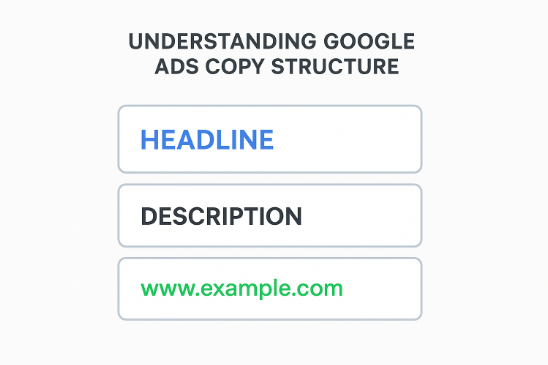
The way Google combines these elements means you need to write modular copy: headlines and descriptions that work together in any combination. Each headline should make sense on its own, and each description should support your overall message without relying on specific headlines appearing with it.
From our experience running hundreds of B2B campaigns, the businesses that treat these fields as interconnected pieces of a larger message, rather than isolated components, consistently see better performance. Your ad is telling a story, even if it's only a few dozen characters long.
How to Write Google Ads Headlines That Get Clicks
Your headline is the first thing people see, which makes it the most important part of your ad. This is what we mentioned earlier about grabbing attention in those critical 2-3 seconds. The headline needs to be eye-catching, relevant, and compelling enough to stop someone mid-scroll. There are many pointers we'll cover in this section that can help you write the perfect headline that actually gets clicks.
Start With Your Primary Keyword
The most effective headlines include the exact keyword someone just searched for. When people see their search term in your ad, it signals "this is relevant to what I'm looking for."
If someone searches "project management software for teams," and your headline says "Project Management Software for Teams," that instant relevance increases your chances of getting the click.
But don't stop at just repeating the keyword. Add context that makes your offer stand out:
- "Project Management Software – Free Trial"
- "Team Project Management | 14 Days Free"
- "Project Management for Growing Teams"
Each version includes the keyword but adds a differentiator: free trial, specific duration, target audience. That extra layer turns a generic match into a compelling reason to click.
Read also: Keyword Research for Google Ads: 2025 Guide
Lead With Benefits, Not Features
People don't search because they want features. They search because they have problems to solve or goals to achieve. Your headlines should speak to those outcomes.
Instead of "Cloud-Based Accounting Platform," try "Simplify Your Accounting in Minutes." The first is a feature (cloud-based), the second is a benefit (simplify, save time).
More examples:
Feature-focused: "Advanced CRM with Custom Fields" Benefit-focused: "Close More Deals with Smart CRM"
Feature-focused: "24/7 IT Support Services Available" Benefit-focused: "Never Worry About IT Issues Again"
Feature-focused: "Premium LinkedIn Lead Generation Tool" Benefit-focused: "Get Quality B2B Leads on LinkedIn"
The benefit-focused headlines connect with what people actually want. When you're writing headlines, always ask: "What does this do for them?" That answer becomes your headline.
Use Numbers and Specifics
Vague promises don't build trust. Specific claims do.
"Save Money on Insurance" is generic. Everyone says that. But "Save 30% on Business Insurance" is concrete and believable.
Numbers make your headlines more tangible:
- "Get Leads in 48 Hours, Not Weeks"
- "Join 5,000+ Businesses Using Our Platform"
- "Reduce Costs by Up to 40%"
Even without hard numbers, you can add specificity:
- "Expert Dubai-Based Accountants" (location adds credibility)
- "Same-Day Installation Available" (timeframe creates urgency)
- "ISO-Certified Quality Management" (qualification builds trust)
We've consistently seen that headlines with specific numbers or qualifications outperform vague ones. Prospects respond to concrete details because they feel more real and trustworthy.
Create Urgency Without Being Pushy
Urgency works, but only when it's genuine. Fake scarcity ("Only 2 spots left!") damages trust and rarely converts quality leads.
Real urgency comes from legitimate time-sensitive offers or consequences of inaction:
- "Q4 Budget Planning – Book Your Consultation"
- "Limited Slots for January Projects"
- "Avoid Compliance Penalties – Get Help Now"
The first two examples use natural scarcity (quarterly timing, project capacity). The third highlights a real consequence of delay.
Even without explicit urgency, action-oriented language moves people forward:
- "Start Your Free Trial Today"
- "Get Your Quote in 5 Minutes"
- "Schedule Your Assessment This Week"
These phrases don't manufacture false scarcity. They simply remove friction and encourage immediate action.
Test Different Angles
Don't assume you know which message will resonate most. Write headlines that test different approaches:
Different value propositions:
- "Enterprise-Grade Security for SMBs"
- "Affordable IT Support for Growing Teams"
- "White-Glove IT Service, No Contract"
Different objections addressed:
- "No Setup Fees, Cancel Anytime"
- "Live Support 24/7, Never Wait"
- "Transparent Pricing, No Hidden Costs"
Different emotional triggers:
- "Finally Understand Your Business Finances"
- "Stop Losing Time on Manual Processes"
- "Get Peace of Mind with Managed IT"
The beauty of Google's responsive search ads is that you can test 15 different headlines simultaneously. Use that space to experiment with varied messaging and let performance data show you what works.
From working with clients across industries, we've learned that what performs best often surprises everyone. The headline you think is clever might bomb, while a straightforward value proposition crushes it. That's why testing matters more than guessing.
Writing Descriptions That Convert
Headlines grab attention. Descriptions build interest and drive action. So you've done a good job crafting an eye-catching headline. Great! But the work doesn't stop there. You need to continue with the same level of effort and strategy in your descriptions. A strong headline without an equally compelling description is like opening a door and finding an empty room. Here's how to write descriptions that turn that initial interest into actual clicks.
Expand on Your Headline Promise
Your description should naturally follow from what your headline claims. If your headline says "Project Management Made Simple," your description should explain how you make it simple.
Headline: "Project Management Made Simple" Description: "Visual workflows your team actually uses. Start collaborating in minutes, no training required."
The description delivers on the "simple" promise with specific details: visual workflows, quick start, no training. That consistency builds trust and momentum toward the click.
Avoid the mistake of using your description to talk about something completely unrelated to your headline. When there's a disconnect between the headline and description, people get confused and move on.
Get the Complete Google Ads Management Solution for Your UAE Service Business - Book Your Free Strategy Session Today
Highlight Your Unique Value
Your description is your chance to differentiate yourself from competitors. What makes you different? What do you offer that others don't?
These could be:
- Unique service delivery: "Dedicated account manager included with every plan"
- Specialized expertise: "15+ years serving healthcare organizations"
- Specific guarantees: "Results in 90 days or money back"
- Geographic advantage: "Local Dubai team with global expertise"
Whatever sets you apart, your description should make it clear. This is where you turn "we do X" into "we do X in a way that matters to you."
In our experience managing campaigns for B2B services, the descriptions that perform best are the ones that answer the unspoken question every prospect has: "Why should I choose you over everyone else?"
Include a Clear Call-to-Action
Every description should tell people what to do next. Not every description needs "Click here now!" but each should guide toward action.
Strong CTAs for different situations:
For free trials/consultations:
- "Start your 14-day free trial. No credit card required."
- "Book a free consultation. Available this week."
For information gathering:
- "Download our buyer's guide. Get expert insights."
- "See pricing. Transparent quotes in 24 hours."
For immediate action:
- "Get a quote today. Speak with our team now."
- "Schedule your demo. See results in 30 minutes."
Notice these CTAs do two things: they tell you what to do (start trial, book consultation, download guide) and they remove friction (no credit card, available this week, in 24 hours).
The best CTAs don't just command action. They make action feel easy and risk-free.
Keep It Scannable and Clear
People don't read ads. They scan them. Your description needs to communicate value in the 2-3 seconds someone glances at it.
Some practical tips:
Use sentence fragments when helpful: Full sentences aren't always necessary. "Trusted by 1,000+ businesses. Award-winning support. 30-day guarantee." gets the point across faster than paragraph form.
Front-load the important stuff: Put your strongest point first. If someone only reads the first few words, they should still get value.
Avoid jargon unless it signals expertise: Technical terms work when your audience expects them ("SOC 2 compliant" for security-conscious buyers) but hurt when they create confusion.
One idea per sentence: Each sentence should convey one clear benefit or detail. Cramming multiple points into one sentence reduces clarity.
We tend to write descriptions like we're talking to a busy person who's scanning quickly, because that's exactly what's happening. Clarity beats cleverness every single time.
Read also: How to Structure a Google Ads Account: Guide for Better Campaigns
Call-to-Action Ideas That Drive Clicks
Your CTA is the bridge between interest and action. Here are proven approaches that work across different B2B scenarios, tested in real campaigns and shown to drive higher click-through rates when matched to the right audience and offer.
For Service-Based Businesses
When offering consultations:
- "Book Your Free Consultation"
- "Schedule a Strategy Session"
- "Get Expert Advice – Call Now"
- "Speak with a Specialist Today"
When offering quotes:
- "Request Your Free Quote"
- "Get Pricing in 24 Hours"
- "Calculate Your Savings"
- "See What You'll Pay"
When offering assessments:
- "Get a Free Site Assessment"
- "Schedule Your Audit"
- "Request a Free Evaluation"
- "Start with a Needs Analysis"
Find Out What Is Holding Your Google Ads Back: Book a Free Google Ads Audit
For SaaS and Software
Trial-focused:
- "Start Your 14-Day Free Trial"
- "Try It Free – No Credit Card"
- "Test Drive All Features"
- "Sign Up Free in 60 Seconds"
Demo-focused:
- "See It in Action – Book Demo"
- "Watch a 10-Minute Demo"
- "Schedule Your Live Walkthrough"
- "Get a Personalized Demo"
Comparison-focused:
- "Compare Plans and Pricing"
- "See All Features"
- "Find Your Perfect Plan"
- "Calculate Your ROI"
For Lead Generation and Content
Download-focused:
- "Download the Free Guide"
- "Get Your Copy Now"
- "Access the Full Report"
- "Grab Your Free Template"
Learning-focused:
- "Watch the Free Webinar"
- "Learn the 5 Key Steps"
- "Get Expert Tips"
- "Read the Case Study"
Evaluation-focused:
- "Take the Quiz"
- "Get Your Score"
- "Use the Calculator"
- "Check Your Results"
The pattern you'll notice: effective CTAs combine action verbs with clear value and often remove friction. "Start Your Free Trial" is good. "Start Your 14-Day Free Trial – No Credit Card" is better because it adds specificity and removes a common objection.
When testing different CTAs in your campaigns, pay attention to which phrases resonate most with your specific audience. B2B buyers often respond better to "Schedule," "Request," and "Get" rather than pushy language like "Buy Now" or "Act Fast."
Common Google Ads Copywriting Mistakes to Avoid
Many clients come to us after running ads that technically follow best practices but still don't perform. We've witnessed these mistakes repeatedly across different industries and campaigns. By pointing them out here, we can help you avoid the same pitfalls and save you time, money, and frustration. Even experienced marketers make these errors. Avoiding them will put your ads ahead of most of your competition.
Mistake 1: Using all 15 headline slots with the same message. Google rotates headlines to find the best combinations. If all 15 headlines say essentially the same thing, you're not giving Google anything to test. Write headlines with different angles, value propositions, and messages.
Mistake 2: Forgetting mobile viewers. Over 60% of searches happen on mobile devices. Your ads need to work on small screens. Long headlines get truncated. Dense descriptions become hard to scan. Test how your ads look on mobile before launching.
Mistake 3: Matching competitor claims without differentiation. If every ad in your space promises "affordable, reliable, fast service," your ad needs to break that pattern. Either be more specific ("Save 30% vs. industry average") or highlight something different entirely ("White-glove onboarding included free").
Mistake 4: Writing for yourself instead of your audience. Your internal terminology, product names, and company values might matter to you, but prospects care about their problems and goals. Use language they use, not language you prefer.
Mistake 5: No clear next step. Every ad should make it obvious what happens after someone clicks. "Learn more" is vague. "Get your free quote in 5 minutes" sets clear expectations.
Mistake 6: Overusing punctuation and capitalization. Google has policies against excessive caps and punctuation (e.g., "BEST DEAL!!!"). But even within the rules, less is more. One exclamation point for emphasis works. Five question marks looks desperate.
Mistake 7: Ignoring ad extensions. Your headline and description aren't the only copy in your ads. Sitelinks, callouts, and structured snippets give you more real estate to communicate value. Use them to reinforce your message and provide additional reasons to click.
Usually, when we dig into underperforming campaigns, the issue is one of these mistakes, especially writing for themselves instead of their audience. When we shift the copy to mirror how prospects actually think and speak, performance improves almost immediately.
How to Test and Optimize Your Google Ads Copy
Writing good copy is half the battle. The other half is knowing what's working and improving it over time.
Here's the good news: optimization becomes much easier when you have a solid base to work with. If you did a good job writing your initial copy: clear headlines, relevant descriptions, strong CTAs, you're already ahead. The foundation is there, which makes testing and refinement straightforward. But don't mistake "easier" for "effortless." Optimization still requires consistent work and attention. It's an ongoing process, not a one-time fix. Let's look at what you can do and how to approach it systematically.
Use Responsive Search Ads Effectively
Responsive search ads let you provide up to 15 headlines and 4 descriptions. Google tests combinations and shows the ones that perform best.
To get the most from this format:
Write diverse headlines. Don't just rephrase the same message 15 times. Include different value propositions, benefits, keywords, and CTAs so Google has real variety to test.
Pin strategically, but sparingly. You can pin specific headlines or descriptions to always appear in certain positions. This is useful for ensuring your primary keyword always shows in headline 1, but over-pinning limits Google's ability to optimize. We've found that pinning 1-2 critical elements and leaving the rest flexible works best.
Monitor asset-level reporting. Google shows you which individual headlines and descriptions perform best. Replace low performers with new variations based on your best performers.
Aim for "Excellent" ad strength. Google rates your ad strength based on diversity and relevance. "Excellent" ads typically perform better, but don't sacrifice message quality just to hit this score.
Track What Actually Matters
Don't get lost in vanity metrics. Focus on measurements that connect to business outcomes:
Click-through rate (CTR): Shows how compelling your copy is. Higher CTR usually means more relevant, interesting ads. But CTR alone doesn't mean conversions.
Conversion rate: Shows how many clicks turn into actual leads or sales. This tells you if your ad copy is attracting the right people.
Cost per conversion: The ultimate metric. Good copy attracts qualified prospects at lower cost. If your cost per conversion is high, your copy might be attracting unqualified clicks.
Quality Score: Google's rating of ad relevance. Higher Quality Scores mean lower costs and better ad positions. Good copy directly improves this.
We have seen this many times: businesses celebrate high CTRs without checking if those clicks convert. An ad with 8% CTR that converts at 1% is worse than an ad with 4% CTR that converts at 4%. Always look at the full picture.
Run Controlled Tests
Don't change everything at once. Test one element at a time so you know what drives improvement.
Test headlines independently: Create two ad variations that are identical except for one headline. This isolates what's driving the difference.
Test different value propositions: One ad emphasizes price, another emphasizes quality, a third emphasizes speed. See which resonates most with your audience.
Test different CTAs: "Get a quote" vs. "Book a consultation" vs. "Start free trial." Small wording changes can have big impact on conversion rates.
Give tests time to reach significance: Don't call a winner after 20 clicks. Wait until you have at least a few hundred clicks per variation and clear statistical separation in performance.
Learn from Your Winners
When you find copy that works, understand why it works. Is it the specific benefit you highlighted? The way you phrased the CTA? The social proof you included?
Then apply those insights to other ads, other campaigns, even other channels. Based on our data, the patterns that work in one campaign often work in others, but only if you take time to identify and replicate them intentionally.
Bringing It All Together
Look, we've covered a lot here. If your head is spinning a bit, that's completely normal. Google Ads copywriting isn't rocket science, but there are definitely moving parts to keep track of.
Here's what we want you to take away from all of this: you don't need to be a copywriting genius to write ads that work. You just need to be clear about what you're offering, understand what your prospects actually care about, and speak to them in a way that feels genuine. Start with headlines that grab attention and include the keywords people are searching for. Build on that with descriptions that make your value clear and give people a reason to choose you. And always, always, make it obvious what they should do next.
The beautiful thing about Google Ads is that you don't have to get it perfect on the first try. You can test, learn, and improve. Write a few variations, see what performs better, and keep refining. Pay attention to the data, but also trust your instincts about what resonates with your audience. Sometimes the headline you think is just "okay" ends up being your best performer.
One more thing: don't overthink this to the point of paralysis. Perfect copy that never gets published doesn't help anyone. Get something solid written, launch it, and improve from there. You'll learn more from real performance in two weeks than from theorizing for two months.
If you're struggling to write copy that performs, or if you're looking for help optimizing campaigns that aren't delivering results, we'd be glad to help. At Lead Ember, we work with B2B service businesses globally to create Google Ads campaigns that actually generate leads and revenue, not just traffic. Based in Dubai and Abu Dhabi, our team has seen what works across industries and markets.
Effective ad copy doesn't have to be complicated, but it does require understanding your audience, testing systematically, and refining based on performance. If you need guidance on your specific situation or want someone to handle the copywriting and optimization for you, feel free to reach out. We're here to help you get results.

I’ve taken enjoyment in building and growing businesses over the past 5 years.
I help service-based and B2B companies generate qualified leads and scale through data-driven campaigns.

.svg)

